FB 建議貼文

選取貼文複製成功(包含文章連結)!

Google 地圖存太多地點分辨不出來?教你用表情符號建立「漢堡清單」

Google 地圖存太多地點分辨不出來?教你用表情符號建立「漢堡清單」

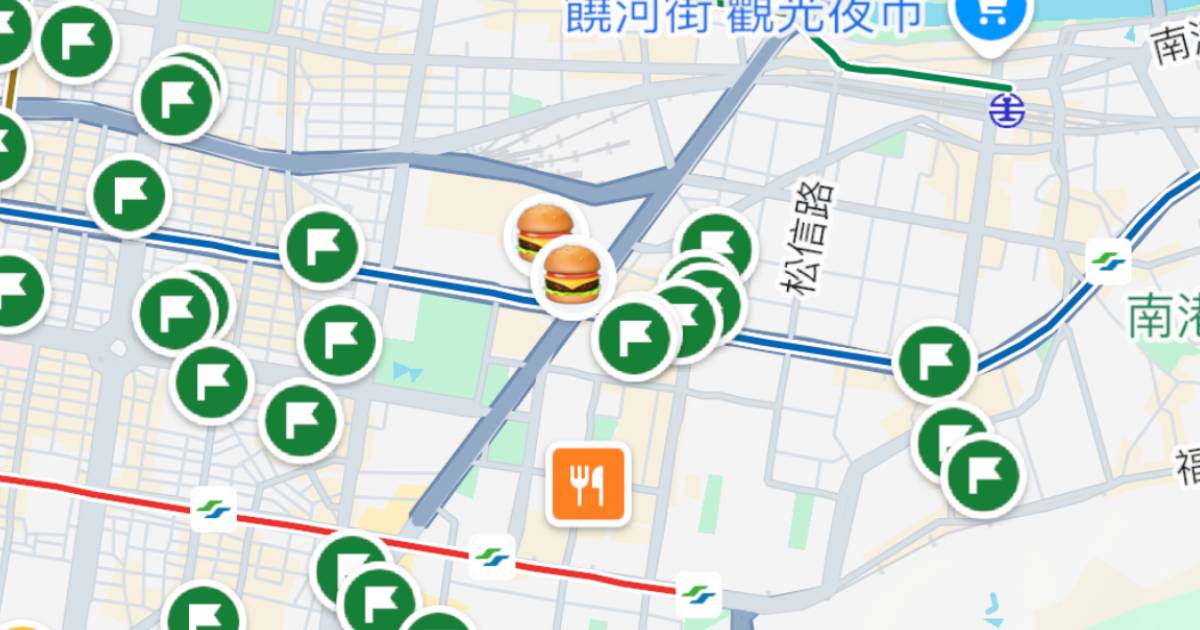
將地點儲存到清單是 Google 地圖最受歡迎的功能之一,但當儲存的地點越來越多,滿版的標籤往往讓人難以一眼辨識地點類型。這時其實可以在 Google 地圖中新建清單,並設定專屬 emoji,例如「漢堡清單」、「健行清單」等。如此一來,就能透過不同的表情符號快速分辨各類地點,找起來也更直覺。

步驟 1:打開 Google 地圖,進入「個人中心」,點選「新增清單」。

Google 地圖存太多地點分辨不出來?教你用表情符號建立「漢堡清單」

步驟 2:這裡以建立漢堡清單為例,將名稱設為「漢堡」,再點選上方的表情符號來選擇圖示。

Google 地圖存太多地點分辨不出來?教你用表情符號建立「漢堡清單」

步驟 3:接著畫面上會跳出手機內建的 emoji,亦可使用搜尋功能,選好後按下儲存。

Google 地圖存太多地點分辨不出來?教你用表情符號建立「漢堡清單」

步驟 4:再來找到想加入清單的地點,點選「儲存」圖示。

Google 地圖存太多地點分辨不出來?教你用表情符號建立「漢堡清單」

步驟 5:將地點加入剛剛建立的清單並按完成。

Google 地圖存太多地點分辨不出來?教你用表情符號建立「漢堡清單」

步驟 6:之後就能在眾多儲存清單中,一眼看出哪個是漢堡店了。

Google 地圖存太多地點分辨不出來?教你用表情符號建立「漢堡清單」

本文同步刊載於 PC home 雜誌

Google 地圖存太多地點分辨不出來?教你用表情符號建立「漢堡清單」

歡迎加入 PC home 雜誌粉絲團

ycr
作者

PC home 雜誌、T 客邦編輯,也負責 T 客邦影新聞 YouTube 頻道影音製作。關注 AI 相關應用、產業趨勢等消息,並有軟體教學報導。(大頭貼為 AI 生成)

Jackson123
1.  Jackson123 (發表於 2026年6月17日 18:04)
I know your expertise on this. I must say we should have an online discussion on this. Writing only comments will close the discussion straight away! And will restrict the benefits from this information.강남도파민 http://dopamine.clickn.co.kr/
cebehoy
2.  cebehoy (發表於 2026年6月29日 20:05)
Discount put up, Regards for the purpose of showing This unique practical knowledge. Excellently crafted piece of writing, if perhaps virtually all web guru proposed an identical standard of articles and other content whenever you, the on-line world will be more effective destination. Why not keep writing! 성인 PC방 먹튀검증 http://kup.clickn.co.kr/
Jackson123
3.  Jackson123 (發表於 2026年6月30日 17:39)
This is actually the content Now i'm searching for anywhere. Regards for use on your web page, I simply subscribe your blog. They can be a excellent web page. . 성인 PC방 단속 https://kup.clickn.co.kr/
發表回應
謹慎發言,尊重彼此。按此展開留言規則